Last reviewed: November 23, 2026
SUMMARY:
- Microsoft Purview pricing for Fabric security has two parts: per-user Microsoft 365 licences, plus pay-as-you-go meters for Fabric items billed to Azure.
- Microsoft 365 E3 covers manual sensitivity labels, so many Fabric teams can start protecting data with no new Purview spend.
- Automatic labelling, Insider Risk Management and the admin who sets up DLP for Fabric need an E5-level licence, such as Microsoft 365 E5 or the $12 Purview Suite add-on.
- DLP for Fabric costs about 50 cents per in-scope item per month, so the workspaces you choose decide the bill.
- Governance is leaving the Purview bill: Microsoft is retiring Purview Data Governance and including governance in Fabric capacity.
Table of Contents
- What Does Microsoft Purview Pricing Cover Now?
- What Microsoft 365 E3 Already Includes
- When You Need Microsoft 365 E5 or the Purview Suite
- How Microsoft Purview Pricing Works on Pay-As-You-Go
- Microsoft Purview Pricing in Four Worked Scenarios
- How to Keep Microsoft Purview Pricing Predictable
- When You Shouldn’t Pay for More Purview Yet
What Does Microsoft Purview Pricing Cover Now?
Microsoft Purview pricing now covers security and compliance only. You pay per user for Microsoft 365 licences, and you pay per use for meters that protect your Fabric data. Governance is leaving the Purview bill, though existing governance accounts stay in maintenance mode, on their current meters, through November 12, 2027. Microsoft is retiring Purview Data Governance. It says governance in Fabric is now “included in Fabric capacity rather than billed through separate meters” (Microsoft’s announcement, November 12, 2026).
Microsoft Purview is Microsoft’s family of data security and compliance tools. For a Fabric buyer, three of them matter most:
- Sensitivity labels. Tags such as “Confidential” that classify data and travel with it.
- Data loss prevention (DLP). Rules that spot sensitive data in Fabric items and warn people or restrict access.
- Insider Risk Management. Alerts on risky behavior, such as someone pulling large amounts of data before they leave.
The two parts of the bill work together. Microsoft says pay-as-you-go “builds on the per-user licensing model. The two are complementary, not mutually exclusive” (Learn about Microsoft Purview billing models, updated October 2026).
If you still run Purview Unified Catalog, read Microsoft Purview After the Governance Retirement: What Changed, What Didn’t and What to Do first. This article doesn’t price governance.
A note on our interest: XTIVIA is a Microsoft partner, and we sell Purview and Fabric services. We’ve tried to show where you can spend less, or nothing.
What Microsoft 365 E3 Already Includes
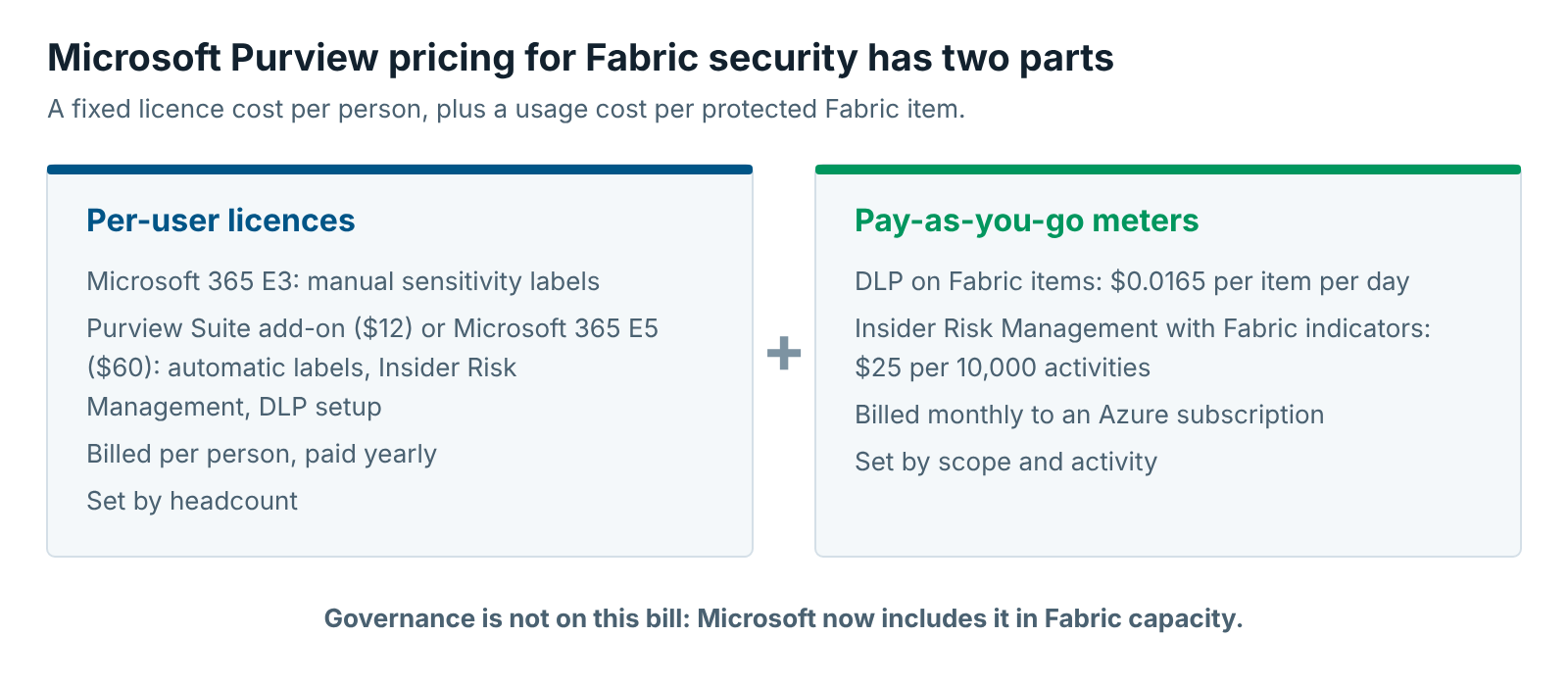
Microsoft 365 E3 already covers manual sensitivity labels. People can apply and see labels on Fabric and Power BI items with no Purview upgrade. That comes from the Microsoft Purview service description (updated November 2026). For many teams, that is the right first step.
There are two catches:
- Power BI licences still apply. To label Power BI items, a user also needs Power BI Pro or Premium Per User (Information protection in Fabric). Power BI comes with Microsoft 365 E5, not E3.
- Labels by policy aren’t in E3. Automatic labelling needs Microsoft 365 or Office 365 E5, the Purview Suite or E5 Information Protection & Governance.
A label can flow from a lakehouse to the reports built on it. Our article Sensitivity Labels in Microsoft Fabric: How Inheritance Really Works shows how.
When You Need Microsoft 365 E5 or the Purview Suite
You need an E5-level licence once you want Purview to act for you. That means automatic labelling, Insider Risk Management, and setting up DLP rules for Fabric. Microsoft sells these features in two main ways, and both are paid yearly (Microsoft Purview Suite pricing, read November 2026).
| Option | US list price | Requires | What else you get |
|---|---|---|---|
| Purview Suite add-on | $12 per user per month | Microsoft 365 E3, or Office 365 E3 plus EMS E3 | Advanced Purview features only |
| Microsoft 365 E5 | $60 per user per month | Nothing else | Everything in E3, plus Purview, security tools and Power BI |
The Purview Suite is the new name for Microsoft 365 E5 Compliance. Microsoft says the rename didn’t change features or price. Microsoft 365 E5 rose from $57 to $60, and E3 from $36 to $39, on July 1, 2026. The Purview Suite stayed at $12 (Microsoft’s 2026 pricing update). Existing customers keep their old prices until renewal. Enterprise agreements and other countries often pay different amounts.
For DLP in Fabric, the licence rule is narrow. It applies to the admin who sets up the DLP rules (Configure DLP policies for Microsoft Fabric). That admin needs E5, E5 Compliance, E5 Information Protection & Governance or Purview capacities. You don’t need E5 for every Fabric user just to run DLP.
How Microsoft Purview Pricing Works on Pay-As-You-Go
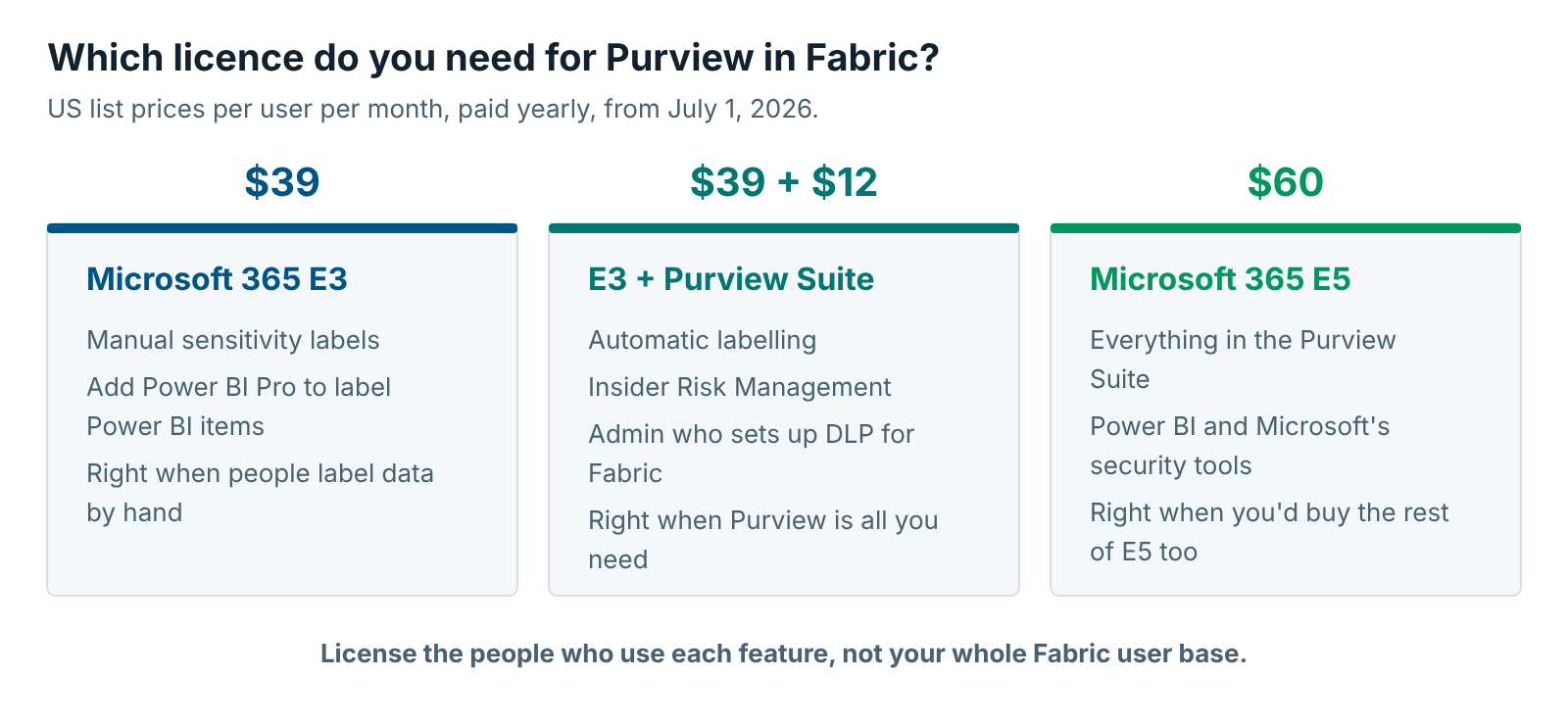
Pay-as-you-go is how Microsoft Purview pricing reaches your Fabric data. You link your Microsoft 365 tenant to an Azure subscription. Purview counts usage each day, and Azure bills the total each month. Only a Global Administrator can turn it on, and charges appear in Cost Management + Billing in the Azure portal (Enable pay-as-you-go).
A meter is a usage counter. Two meters matter most for Fabric security. Rates are US list prices for East US, from Microsoft’s Azure Retail Prices API, checked November 23, 2026.
| What you turn on | What it counts | List rate |
|---|---|---|
| DLP and protection policies on Fabric items | Each item in scope of a policy, per day | $0.0165 per item per day |
| Insider Risk Management with Fabric indicators | Processing units; one unit handles 10,000 user activities | $25 per unit |
Three rules decide what you pay:
- In scope means billed. An item counts if a policy covers its workspace, even if it holds no sensitive data. Microsoft’s example: “A tenant has 10 Fabric workspaces, each with 50 assets. The policy only applies to five of these Fabric workspaces. The asset count for this policy is 250.”
- Each item counts once. “An asset is only counted once, regardless of how many solutions or protection policies cover it” (billing models).
- Fabric signals for Insider Risk need pay-as-you-go. “To use the Microsoft Fabric indicators, enable pay-as-you-go billing in your organization” (Configure policy indicators). Those indicators cover Fabric workloads such as Power BI and lakehouses.
At $0.0165 a day, one item costs about 50 cents per 30 days. Microsoft also notes that “DLP evaluation workloads impact capacity consumption,” and points to its billing models page for how that is metered (Get started with DLP for Fabric and Power BI).
Copilot users have one more thing to check. Managing Copilot in Fabric with Purview “requires you to enable pay-as-you-go billing” (Microsoft Purview for Copilot in Fabric). The same page lists the enterprise version of Purview data governance as a requirement. New data governance accounts can no longer be created, so ask your Microsoft account team how this works before you plan around it.
Microsoft Purview Pricing in Four Worked Scenarios
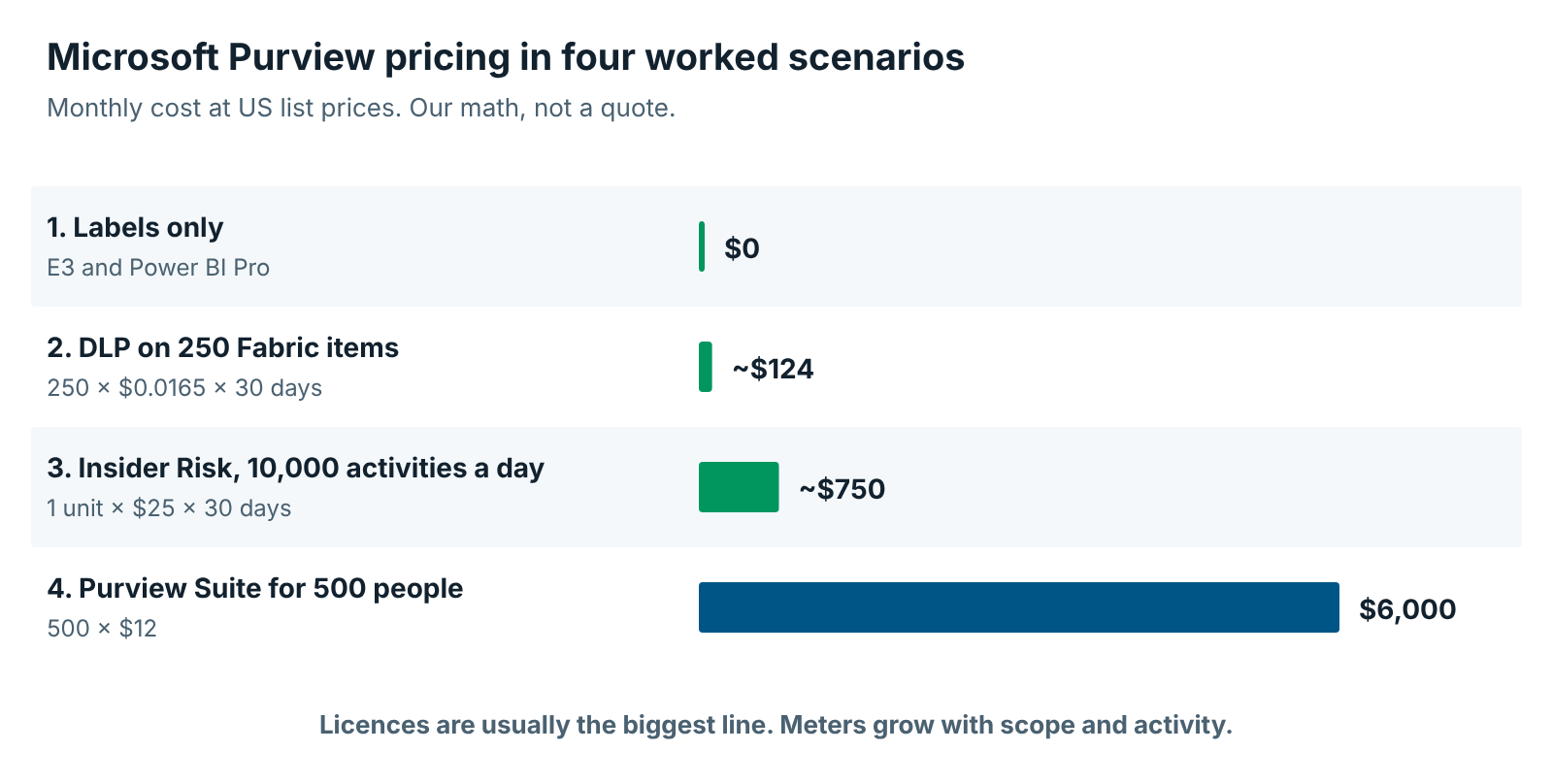
Microsoft Purview pricing for Fabric depends on what you turn on. Here are four common cases, priced from the list rates above. The totals are our own math: rate × count × 30 days, or price × users. They size the problem; they aren’t quotes.
1. Labels only. A team labels its Fabric items by hand with Microsoft 365 E3 and Power BI Pro. New Purview spend: none.
2. Labels plus DLP on sensitive workspaces. A team puts a DLP policy on 5 of its 10 workspaces, with 50 items each. That’s Microsoft’s own example, so 250 items are in scope. The meter comes to about $124 per 30 days (250 × $0.0165 × 30). If no admin has an E5-level licence yet, one Purview Suite licence for that admin adds $12 a month.
3. Insider Risk Management with Fabric indicators. Suppose your people create about 10,000 Fabric activities a day that the policy watches. That is one processing unit a day, or about $750 per 30 days ($25 × 30). Double the activity and the meter doubles. The people the policy covers also need E5, the Purview Suite or the E5 Insider Risk Management add-on.
4. The licence choice for 500 people on E3. Adding the Purview Suite costs $6,000 a month (500 × $12). Moving the same 500 people to E5 adds $10,500 a month (500 × $21). E5 also brings Power BI and Microsoft’s security tools. If you’d buy those anyway, E5 can be the better deal. If you only want Purview, the Suite is.
Insider Risk Management is the hardest to size in advance, because it bills by activity, not by item. Microsoft added a pay-as-you-go usage report for Insider Risk Management in March 2026 (Fabric March 2026 Feature Summary). Pilot one policy on a small group, and read a month of that report before you estimate a full rollout.
How to Keep Microsoft Purview Pricing Predictable
You keep Microsoft Purview pricing predictable by controlling scope and watching the bill from day one. The DLP meter counts what a policy covers, and the Insider Risk meter counts what people do. These steps keep surprises off the invoice:
- Set an Azure budget first. Create a budget and an alert on the subscription before you turn on any meter.
- Scope DLP to named workspaces. Pick the workspaces that hold sensitive data, rather than every workspace in the tenant.
- Pilot Insider Risk Management on a small group. Read the usage report before you widen it.
- License by feature, not by headcount. Buy E5 or the Purview Suite for the people who use the advanced features.
- Price it in the calculator. Microsoft’s Azure pricing calculator includes the Purview meters.
Our article Purview DLP for Fabric: Policy Tips, Restrict Access and What It Won’t Catch explains what you get for the DLP meter. For the bigger picture, start with Microsoft Purview for Fabric: A Practical Guide to Securing and Governing Your Data.
When You Shouldn’t Pay for More Purview Yet
You shouldn’t pay for more Purview yet if your Fabric data holds no regulated or customer data and only your own staff use it. Manual labels under Microsoft 365 E3, plus tight workspace access, may be enough for now. Meters before sensitive data just add cost.
Hold off on paid features in these cases too:
- Your access model is the real problem. DLP flags sensitive data. It won’t fix workspaces that too many people can open. Fix access first.
- No one will read the alerts. Insider Risk Management costs money every day it runs. If no one is assigned to review its alerts, wait until someone is.
- You’re buying E5 for one feature. If Purview is all you want from E5, the Purview Suite on top of E3 costs less.
When sensitive data arrives, guests join, or an auditor starts asking, add the next step: labels, then DLP on sensitive workspaces, then Insider Risk Management. That’s when Microsoft Purview pricing starts to pay for itself. Our Microsoft Fabric consulting and Microsoft Purview services teams can help you plan the order.
Further reading
- Learn about Microsoft Purview billing models — per-user vs pay-as-you-go, and how items are counted
- Microsoft Purview Suite pricing — per-user prices for the Suite and E5
- Microsoft Purview pricing — Microsoft’s pay-as-you-go meters by region
- Microsoft 365 packaging and pricing updates for 2026 — the July 2026 price changes
Pavan Malpani is the Fabric Practice Delivery Lead at XTIVIA, where he leads Microsoft Fabric and Purview delivery for clients. Talk to us.