
SUMMARY:
- To migrate Purview Data Governance to OneLake catalog, inventory what you run, sort each item by how well Fabric covers it, pilot one path, then move in waves.
- Search, domains and ownership move well today; glossary, data products, lineage and access requests move only in part.
- Data quality rules and scanning outside Fabric have no OneLake catalog equivalent, so plan a bridge for each.
- Microsoft documents no bulk export for Unified Catalog objects, so capture glossary terms, owners and rules early.
- Support ends November 12, 2027, so aim to finish your last wave by the summer and keep the autumn as a buffer.
Table of Contents
- What It Takes to Migrate Purview Data Governance to OneLake Catalog
- How Purview Features Map to the OneLake Catalog
- Gaps and Workarounds When You Migrate Purview Data Governance to OneLake Catalog
- What Can You Export From Purview Unified Catalog?
- Five Steps to Migrate Purview Data Governance to OneLake Catalog
- How Long Do You Have to Migrate Purview Data Governance to OneLake Catalog?
- When Not to Move Everything to the OneLake Catalog
- How We Would Approach a Purview Transition
What It Takes to Migrate Purview Data Governance to OneLake Catalog
To migrate Purview Data Governance to OneLake catalog, you rebuild your governance in Fabric rather than copy it across. Microsoft offers no one-click move. Some features have a close match in Fabric, some match in part, and some have no match yet.
Microsoft is retiring the governance side of Microsoft Purview. New Purview data governance accounts can no longer be created, and existing accounts stay in maintenance mode through November 12, 2027, according to the Microsoft Learn retirement notice. The retirement covers Purview Unified Catalog and the classic governance features. Purview’s security and compliance features are not affected.
Microsoft now treats the OneLake catalog as its governance home. The OneLake catalog is Fabric’s built-in place to find, govern and secure data. In its announcement, Microsoft calls it “the single foundation” for governing data.
This playbook is for teams that run Unified Catalog today. If you need the wider picture first, start with our guide, Microsoft Purview After the Governance Retirement: What Changed, What Didn’t and What to Do.
How Purview Features Map to the OneLake Catalog
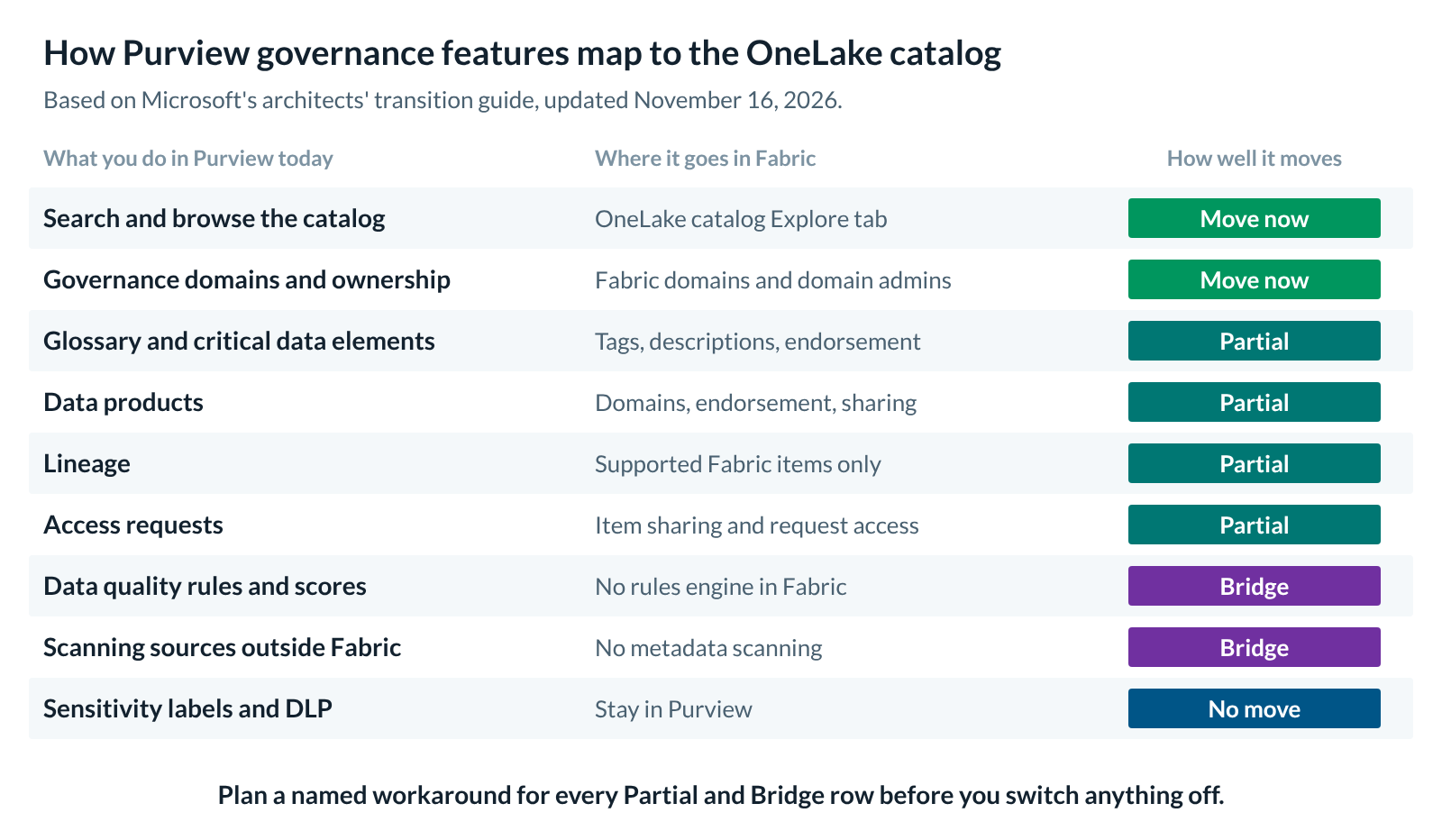
Most Purview governance features have a home in Fabric, but only some are full matches. Microsoft’s architects map each one in their transition guide, updated November 16, 2026, and the ratings below are our reading of it. They warn that “partial” does not mean “equivalent.”
The OneLake catalog has three tabs: Explore, Govern and Secure. The table shows which tab each feature lands in and where to find it there. If the Govern tab isn’t live in your region yet, Microsoft says to use the Fabric admin portal for the existing admin settings.
| What you do in Purview today | Where it goes in Fabric | How well it moves |
|---|---|---|
| Search and browse the catalog | Explore tab: search, filters, the domain and tag selectors, and the item details pane | Move now, for Fabric items |
| Governance domains and ownership | Govern tab > Domains: Fabric domains and subdomains, with domain admins set in each domain’s settings | Move now |
| Glossary and critical data elements | Govern tab > Tags and Endorsement, plus descriptions on each item | Partial |
| Data products | Govern tab > Domains and Endorsement; sharing through Manage permissions on the item in Explore | Partial |
| Lineage | Explore tab: the item’s options menu > Lineage, or the workspace lineage view; impact analysis from the item | Partial: supported Fabric items |
| Data quality rules and scores | Govern tab > View more > “Discover, trust, and reuse”: data freshness and curation | Bridge: no rules engine |
| Access requests | Explore tab: request access and Manage permissions; Secure tab: review workspace roles and OneLake security roles | Partial |
| Scanning sources outside Fabric | No catalog tab: set up shortcuts, mirroring and connectors in a workspace | Bridge: no metadata scanning |
| Sensitivity labels and DLP | Stay in the Purview portal; label coverage shows in Govern tab > View more > “Protect, secure & comply” | No move needed |
Critical data elements are key business fields, like “Customer ID,” tracked across many tables. Endorsement marks a Fabric item as promoted or certified. Only people a Fabric administrator names, or domain admins they delegate to, can certify an item, according to Microsoft Learn.
Gaps and Workarounds When You Migrate Purview Data Governance to OneLake Catalog
Each gap has a workaround you can run today. A workaround is usually a process, a record kept somewhere else, a check moved into your data pipelines, or a partner catalog. Here is what we would plan for each gap.
- Glossary and critical data elements. Fabric has no full business glossary today. Microsoft’s guide says plainly: “Do not claim full glossary or CDE parity.” Keep the full definitions and owners in a governed document or a partner catalog. Use Fabric tags to link key terms to items. Each item can hold up to 10 tags.
- Data quality. Fabric’s governance health view “is not a rules, profiling, and scoring engine,” per Microsoft’s guide. Move your rules into the pipelines that load the data. Our article Data Quality in Fabric With Purview: What It Measures and What It Doesn’t covers the pipeline testing side.
- Sources outside Fabric. Connecting data to Fabric is not the same as scanning its metadata. Keep a separate record of systems that don’t land in Fabric, or use a partner catalog for them.
- Data products. Write down each product’s owner, contract and access process outside the catalog for now. Use Fabric domains and endorsement to make the product easy to find.
- Lineage. Fabric lineage covers supported Fabric items. It shows sources one step upstream and skips downstream items in other workspaces, so use impact analysis for those, as Microsoft Learn explains. Keep another method for lineage across systems.
- Access requests. Keep your request, approval and revoke steps where Fabric doesn’t cover them end to end. Keep the evidence too, because auditors will ask for it.
- Fabric Policies. Policies are still in preview, with “Allow” as the only effect and three policy types. They don’t work yet in the West Europe, North Europe and West US regions. Don’t count on them for full coverage.
The Govern tab in the OneLake catalog is also still “rolling out by region,” according to Microsoft Learn. Check it is live in your region before you plan around it.
What Can You Export From Purview Unified Catalog?
Very little, as far as Microsoft documents today. On November 23, 2026, Microsoft Learn described a bulk import from CSV files, in preview, for glossary terms, critical data elements and data products. We found no documented bulk export for any Unified Catalog object.
That matters because your glossary, owners and data quality rules hold years of business decisions. Fabric has no tool to rebuild them for you. Plan to capture them yourself, early, while the Purview portal still works:
- Glossary terms and critical data elements: names, definitions, owners, stewards and linked assets.
- Data products: owners, descriptions, the assets in each product and the access rules.
- Governance domains: names, owners and which teams sit in each one.
- Data quality rules: what each rule checks, its threshold and who acts when it fails.
- Data quality scores: a dated record of current scores from the Power BI report, so you can compare later.
The classic Purview Data Map glossary is the exception. Its Microsoft Learn page says it supports CSV import and export. Ask your Microsoft account team whether an export path is planned for Unified Catalog. Microsoft’s announcement gives the same advice to regulated customers and those with contract obligations. It says they should “engage with their Microsoft account team early.”
Five Steps to Migrate Purview Data Governance to OneLake Catalog
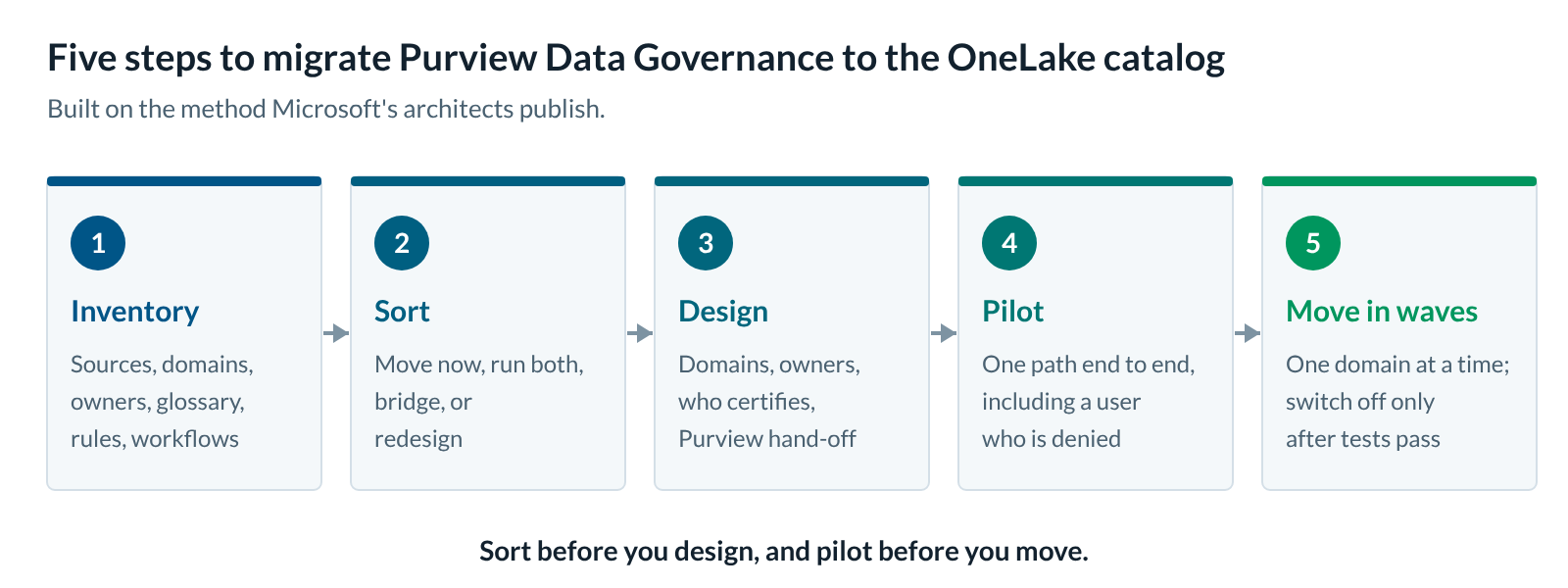
Five steps take you from Purview to Fabric safely, and they follow the method Microsoft’s architects publish. The order matters, because each step depends on the one before it.
- Inventory what you run. List sources, scans, domains, owners, glossary terms, critical data elements, data products, lineage, data quality rules, workflows, access policies, API integrations and licences. Include the evidence your auditors expect you to keep.
- Sort each item into one of four groups. Microsoft’s guide names them: move it now, run both for a while, bridge it with a process or partner, or redesign it.
- Design the Fabric setup. Decide your domains, who owns each one, who can certify data, and how Fabric hands off to Purview for sensitivity labels and data loss prevention (DLP).
- Pilot one path end to end. Pick one business area. Test discovery, lineage, access, labels and audit. Include a user who should be denied, and prove they are. Microsoft’s guide says, “proving that access is blocked is as important as proving it works.”
- Move in waves. Move one domain or business area at a time. Turn off a Purview feature only after its replacement passes the tests you agreed on.
Run old and new side by side only as long as you need to. Microsoft’s guide says to run both “only as long as necessary.”
How Long Do You Have to Migrate Purview Data Governance to OneLake Catalog?
You have until November 12, 2027, when support ends. Until then, existing Purview data governance accounts stay in maintenance mode, according to Microsoft Learn. Microsoft hasn’t defined maintenance mode in detail, so plan for fixes only and no new features.
A year sounds like enough. But most of the work is people, not metadata. Owners, stewards and approvers have to agree on new homes and new processes. That takes longer than moving metadata.
Here is the timeline we would suggest for a typical Unified Catalog customer. It is our recommendation, not a Microsoft schedule:
| When | What to finish |
|---|---|
| By end of January 2027 | Inventory, sort, and capture glossary terms, owners and rules |
| By end of March 2027 | Fabric design agreed and pilot complete |
| April to August 2027 | Move in waves, one domain at a time |
| September to November 2027 | Buffer for late items, audits and sign-off |
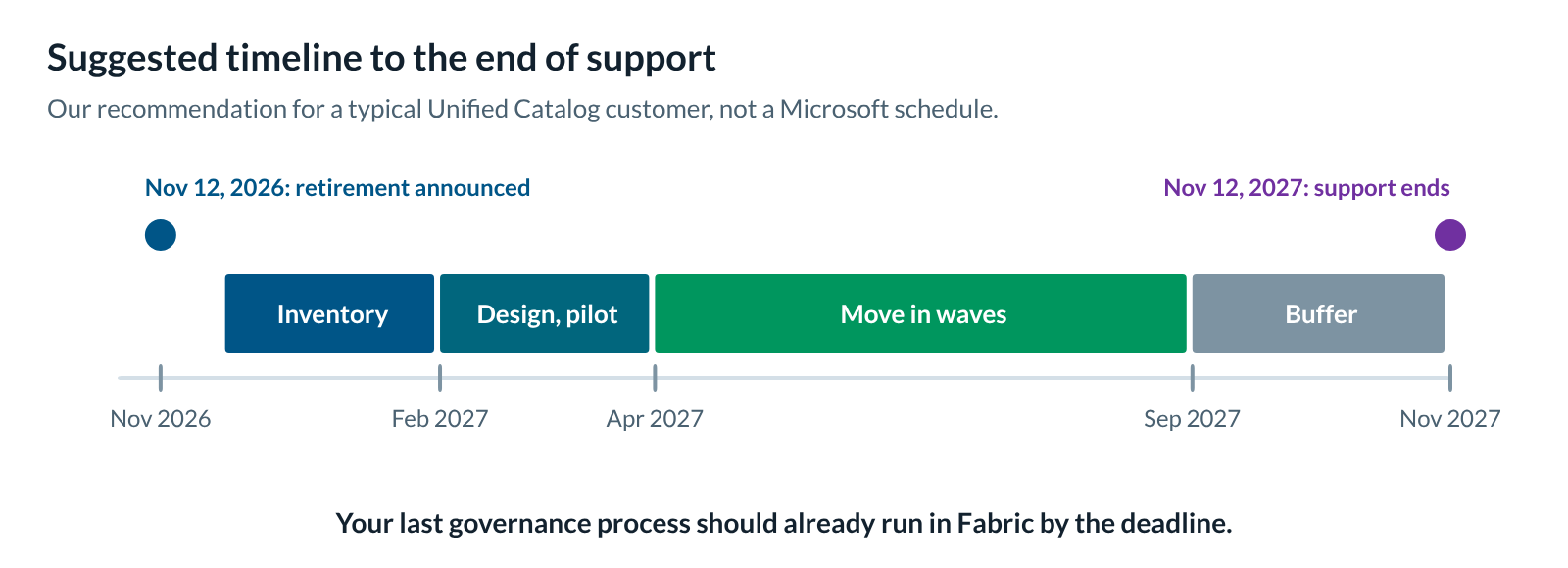
Treat November 12, 2027, as the date your last process must already run in Fabric. It is not the date you start moving.
When Not to Move Everything to the OneLake Catalog
The OneLake catalog is the right home when most of your governed data lives in Fabric. It is a weaker fit in three cases, and in each one part of your governance belongs somewhere else.
- Most of your data lives outside Fabric. If you govern Snowflake, Databricks or on-premises systems that never land in Fabric, the OneLake catalog won’t see their metadata. Microsoft’s announcement names Atlan, Alation, Collibra and Informatica as catalogs that work with Fabric.
- Your glossary runs the business. If regulators or contracts depend on your business definitions, keep them in a tool built for that. Don’t force them into tags.
- Your data quality program is mature. If people act on quality scores every week, move the rules into your pipelines or a dedicated tool before you switch anything off.
There is also a case for moving less now. If your Unified Catalog use is light, set up Fabric domains and endorsement first. Revisit the rest as the gaps close on the Fabric roadmap.
Keep Purview for security and compliance in every case. Sensitivity labels, DLP, Insider Risk Management and audit don’t move. For what those cost now, see our Microsoft Purview Pricing for Fabric: Security and Compliance.
How We Would Approach a Purview Transition
We would start with a short assessment of your Unified Catalog use, then run the five steps above. This approach is built on Microsoft’s published method. The retirement was only announced on November 12, 2026, and this article describes how we would scope the work, not a finished migration.
Worth saying plainly: XTIVIA is a Microsoft partner, and we implement both Fabric and Purview. We still recommend a partner catalog when your data reaches well beyond Microsoft.
We delivered Purview governance for a pension fund and benefits company before the announcement, including a glossary, data products and data quality rules. That is exactly the kind of work this transition affects. It is also why we would capture those decisions first, before any tool changes.
Planning to migrate Purview Data Governance to OneLake catalog? If you want a second opinion, our Microsoft Fabric consulting and Microsoft Purview services teams can help.
Further reading
- From Purview Data Governance to the Fabric OneLake Catalog — Microsoft architects’ feature mapping and transition method
- A next step in the evolution of the Microsoft Data Governance strategy — Microsoft’s announcement, November 12, 2026
- Learn about Microsoft Purview Unified Catalog — Microsoft Learn, with the retirement notice
- OneLake catalog: the Govern tab — Microsoft Learn
Pavan Malpani is the Fabric Practice Delivery Lead at XTIVIA, where he leads Microsoft Fabric and Purview delivery for clients. Talk to us.