Last reviewed: October 29, 2026
SUMMARY:
- To secure Fabric data agents, first fix who can read your data, because agents and Copilot answer with each user’s own permissions.
- Purview data risk assessments find overshared Fabric workspaces, so you can tighten access before an agent makes that data easy to ask about.
- Purview can capture, audit and retain prompts and responses, but coverage beyond Copilot for Power BI is still in preview.
- Sensitivity labels and DLP don’t apply to the AI conversation itself, so protect the source data instead.
Table of Contents
- How Do You Secure Fabric Data Agents?
- What Fabric Copilot and Data Agents Can See
- Fix Oversharing Before You Secure Fabric Data Agents
- Watch Prompts and Responses With DSPM
- Audit, Retain and Investigate AI Activity
- Why Labels and DLP Don’t Cover the Chat
- A Rollout Order to Secure Fabric Data Agents
- When You Can Roll Out Fabric Data Agents Now
How Do You Secure Fabric Data Agents?
You secure Fabric data agents mostly by securing the data behind them. An agent answers with the permissions of the person asking. So the first job is to make sure people can only read what they should. Then Microsoft Purview watches the questions and answers, keeps a record and flags risky use.
A Fabric data agent is a chat assistant you build on your own Fabric data. People ask a question in plain English, and the agent writes and runs a query to answer it (Microsoft Learn). Copilot in Fabric is the built-in AI help across Fabric, such as Copilot for Power BI. Both turn questions into answers about your data, and both raise the same worry for leaders: will they show someone data they shouldn’t see?
Purview is Microsoft’s data security and compliance suite. It adds two things here. It finds overshared data before an agent reaches it. And it captures what people ask and what the AI answers, so security and legal teams can review it.
What Fabric Copilot and Data Agents Can See
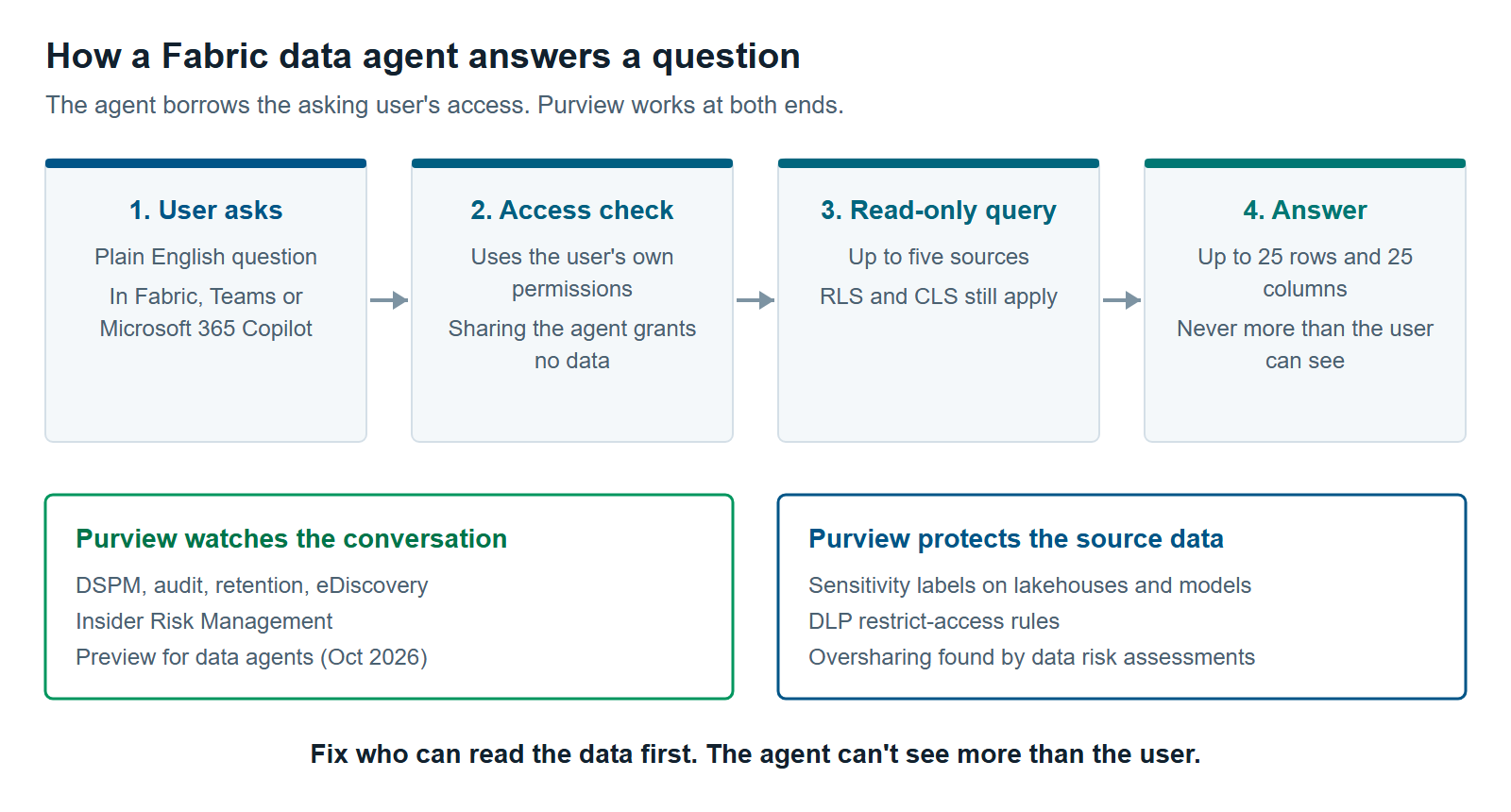
Fabric data agents see only what the person asking can see. Microsoft documents that each agent uses “the requesting user’s credentials and permissions,” and that sharing an agent doesn’t grant access to its data (Microsoft Learn). That’s the good news. It’s also the risk.
Here’s what that means in practice:
- Read-only. Agents only run queries that read data. They can’t change or delete it.
- Up to five sources. An agent can draw on lakehouses, warehouses, Power BI semantic models, KQL databases, ontologies and Microsoft Graph.
- Your security rules still apply. Row-level security (RLS) limits which rows a user sees. Column-level security (CLS) limits which columns. Both still apply when a user asks through an agent.
- Semantic model access is lighter than you might think. Read permission on a semantic model is enough for the agent to query it. The user doesn’t need access to the workspace.
- Answers are short. Responses are capped at 25 rows and 25 columns, so an agent isn’t a bulk export tool.
Agents also travel. You can surface a Fabric data agent in Microsoft 365 Copilot, Copilot Studio or Teams. Microsoft says users can only reach the data their own permissions and Purview policies allow, whatever the entry point.
Fix Oversharing Before You Secure Fabric Data Agents
Oversharing is the first risk to fix for Fabric data agents, and Purview has a tool built to find it. Data risk assessments in Data Security Posture Management (DSPM) scan Fabric workspaces and show who can reach sensitive items. DSPM is Purview’s dashboard for data security risk.
Once set up, a default assessment runs weekly on your 100 most-used Fabric workspaces (Microsoft Learn). It covers lakehouses, warehouses, notebooks, reports, dashboards, pipelines and more. For each workspace, it shows:
- the types of sensitive data found, such as credit card or ID numbers,
- how many items have sensitivity labels and how many don’t,
- who can reach them: specific people, groups, the whole organization or outside users.
From there, DSPM suggests fixes. You can create a data loss prevention (DLP) policy, set a default sensitivity label for new items, or start an access review in Microsoft Entra.
There’s a catch for planning. Fabric assessments need a one-time setup that a Fabric admin and an identity admin do together. They register an app in Microsoft Entra and allow it in the Fabric admin settings. Plan time for that approval step.
Check semantic models separately, because the data risk assessment doesn’t scan them. Because Read permission is enough for an agent, a model shared widely for one report becomes a data source anyone can question in plain English. Check who holds Read, and test RLS before you connect the model to an agent.
Watch Prompts and Responses With DSPM
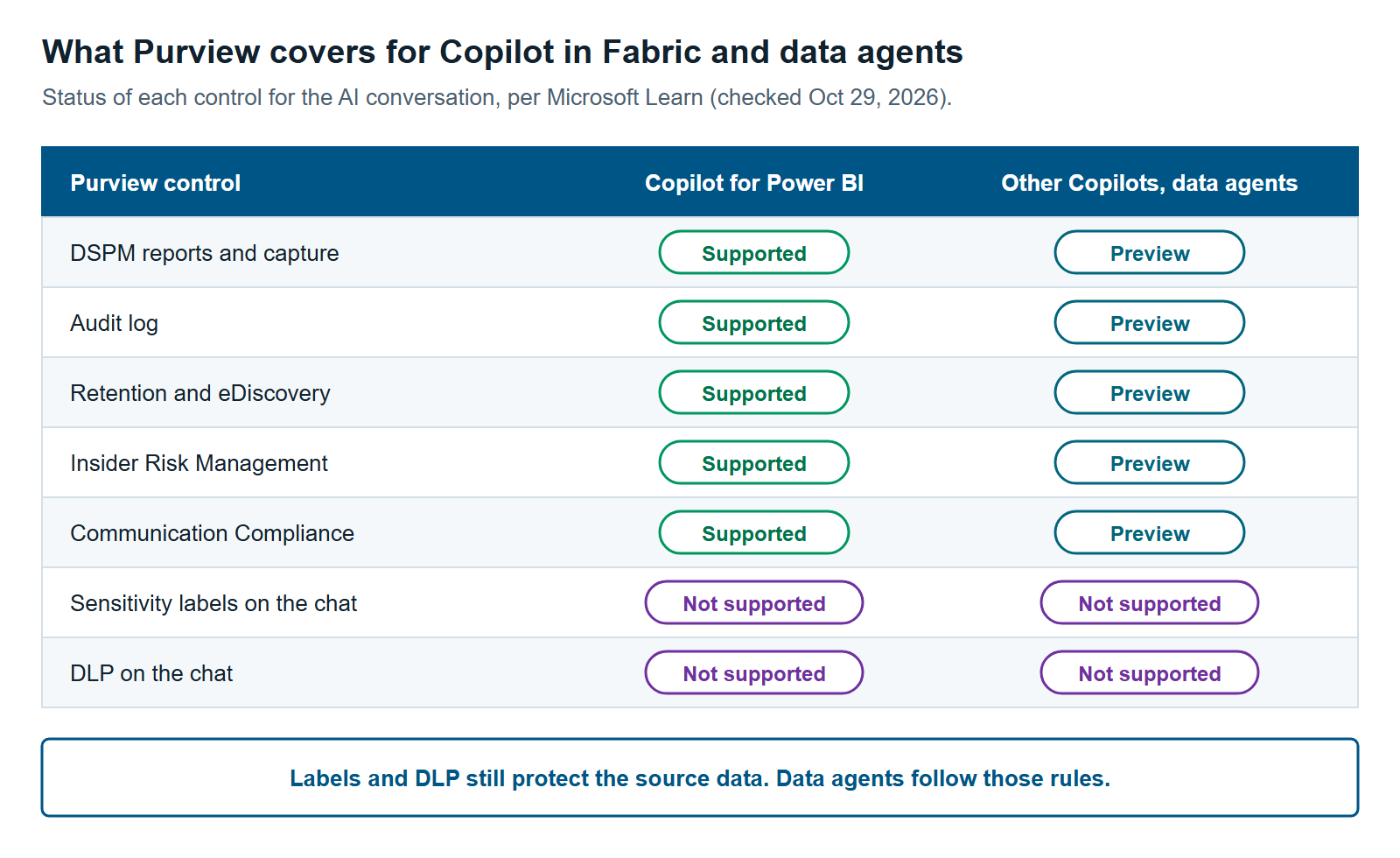
DSPM can capture what people ask Copilot in Fabric and what it answers. Then it flags sensitive data and risky use in those conversations. For Copilot for Power BI, Microsoft supports this for all prompts and text responses. For other Fabric Copilots and for Fabric data agents, it was still in preview when this article was last reviewed (Microsoft Learn).
You’ll see two names in the Purview portal. “DSPM” is the current version. “DSPM for AI (classic)” is the older tool that many setup guides still point to. Both show AI activity for Fabric.
The setup is light, but it isn’t free. You need three things in place:
- The Fabric tenant setting “Allow Microsoft Purview to secure AI interactions.” It’s on by default. Confirm nobody turned it off.
- Pay-as-you-go billing for Purview, turned on in your organization.
- The enterprise version of Purview data governance, which provides the APIs this needs.
Then you turn on a capture policy. Microsoft calls it a collection policy, and DSPM offers it as a one-click recommendation. Wait at least a day, then reports show how many AI conversations happen, which ones held sensitive data and which users look risky.
For a buyer, the preview status matters. Preview features can change and may not carry the same support terms. If you need audit evidence for data agents today, plan for that gap. For what pay-as-you-go billing costs, see Microsoft Purview Pricing for Fabric: What You’ll Actually Pay.
Audit, Retain and Investigate AI Activity
Purview keeps a record of Copilot in Fabric conversations and lets you retain, search and review them like other business records. That matters when a regulator, a lawyer or an internal investigator asks what the AI showed someone. Most of these tools need the same capture policy that DSPM sets up.
Here’s what each one does:
- Audit. Prompts and responses land in the unified audit log, along with when and where the user asked (Microsoft Learn).
- Retention. Data Lifecycle Management keeps or deletes AI conversations on a schedule you set. Choose the “Microsoft Copilot Experiences” location in the policy.
- eDiscovery. Conversations are stored in the user’s mailbox. Legal teams can search, hold and export them in an eDiscovery case.
- Insider Risk Management. A “Risky AI usage” policy template flags things like prompt injection attempts and requests for protected material.
- Communication Compliance. Flags prompts and answers that break conduct rules or share sensitive information.
Fabric itself also sends all user activity to the Purview audit log (Microsoft Learn). So you can see both the chat and the data access around it.
Why Labels and DLP Don’t Cover the Chat
Sensitivity labels and DLP don’t apply to Copilot in Fabric conversations today. Microsoft’s capability table marks both as not supported for these AI interactions (Microsoft Learn). A sensitivity label is a tag such as “Confidential” that travels with data. DLP is a set of rules that warns or blocks when sensitive data is shared the wrong way.
That doesn’t make labels and DLP useless here. It moves where they work. They protect the source data, and the agent respects the DLP and access policies built on them. Microsoft documents that Fabric data agents follow DLP and restrict-access policies on their data sources. A policy can stop a query or leave sensitive data out of an answer (Microsoft Learn).
There’s a trade-off to plan for. When a policy blocks part of the data, users may get incomplete answers without knowing why. Tell agent owners which sources carry DLP rules, so they can explain gaps. For how DLP behaves in Fabric, read Purview DLP for Fabric: Policy Tips, Restrict Access and What It Won’t Catch.
A Rollout Order to Secure Fabric Data Agents
Secure Fabric data agents in five steps, starting with access and ending with monitoring. Access fixes come first because they stop problems before an agent can surface them. Monitoring comes later because it tells you about problems; it doesn’t prevent them.
- List what’s in use. Find the Fabric data agents your teams have built and the Copilot features turned on. Confirm the Purview tenant setting is on.
- Fix access. Run the Fabric data risk assessment. Tighten Read permission on widely shared semantic models, and test RLS on every agent source.
- Protect the sources. Label sensitive lakehouses, warehouses and models. Add DLP restrict-access rules where the data is regulated.
- Turn on capture. Enable pay-as-you-go billing and the collection policy. Agree on retention with legal first.
- Watch and review. Add Insider Risk Management and Communication Compliance policies. Review DSPM reports monthly with the agent owners.
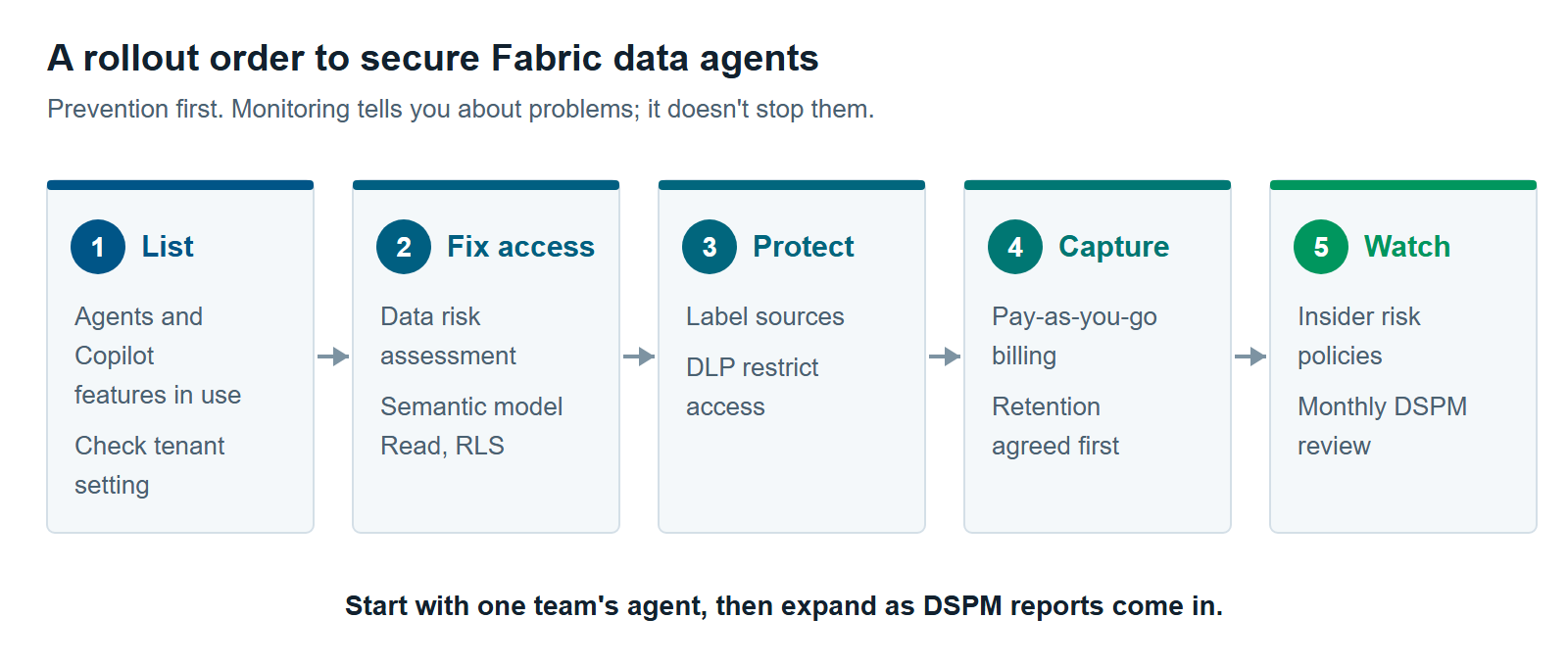
This order isn’t a rule. A team with an audit next quarter may turn on capture first. If you’re also rolling out Microsoft 365 Copilot, run both projects together. The same oversharing work helps both. See Getting Ready for Microsoft 365 Copilot With Purview: Fix Oversharing Before Copilot Finds It.
Our Microsoft Copilot consulting and Microsoft Fabric consulting teams can help you plan the rollout. In the interest of full disclosure, XTIVIA sells Copilot, Fabric and Microsoft Purview services.
When You Can Roll Out Fabric Data Agents Now
You don’t need every Purview control in place before your first Fabric data agent. Because agents use each user’s own access, a small, well-scoped pilot carries little new risk. You can go ahead now when these conditions hold:
- The agent’s sources hold no regulated or highly sensitive data.
- The users are one team that already has approved access to those sources.
- RLS is tested on every semantic model the agent uses.
- You mainly use Copilot for Power BI, where Purview support is no longer preview.
Wait, or fix access first, when the opposite is true. Examples include sensitive data behind widely shared semantic models and regulated workloads. Also wait if you need audit evidence for data agents while that support is in preview.
We recommend most organizations start small. Secure Fabric data agents for one team, learn from the DSPM reports and expand from there. For the full map of Purview tools for Fabric, read Microsoft Purview for Fabric: A Practical Guide to Securing and Governing Your Data.
Further reading
- Use Microsoft Purview to manage data security and compliance for Copilot in Fabric — supported capabilities, preview status and prerequisites
- Fabric data agent creation — how agents use permissions, and their limits
- Prevent oversharing with data risk assessments — the Fabric tab and its setup
- Use Microsoft Purview with Microsoft Fabric — what Fabric governs on its own and where Purview adds to it
Pavan Malpani is the Fabric Practice Delivery Lead at XTIVIA. Talk to us.