
By Pavan Malpani, Fabric Practice Delivery Lead, XTIVIA
Last reviewed: October 28, 2026
SUMMARY:
- Purview data products bundle related tables and reports for one business use, with an owner, a description and one place to request access.
- Fabric domains group workspaces for browsing and delegated settings, while Purview governance domains group data products, terms and policies by business area.
- Microsoft doesn’t document any sync between the two, so mapping Fabric domains to governance domains is a design choice you make once and keep up.
- Access requests run through Purview, but approvers still grant access in Fabric by hand, so plan who does that work.
Table of Contents
- What Are Purview Data Products?
- Fabric Domains vs Purview Governance Domains
- Three Ways to Map Fabric Domains to Governance Domains
- What Goes Into Purview Data Products
- How Access Requests Work for Purview Data Products
- What Data Mesh Looks Like in Fabric and Purview
- How to Start With Purview Data Products
- When Fabric Domains Are Enough
What Are Purview Data Products?
Purview data products are bundles of related tables, files and reports, grouped for one business use and shared as a single unit. Each one has an owner, a description and a way to request access. They live in Purview Unified Catalog, the business catalog in Microsoft Purview (Microsoft Learn).
Think of a “Monthly Revenue” data product. It might hold three gold lakehouse tables and the Power BI report built on them. A finance analyst finds it by name, reads what it’s for and requests access once, instead of chasing each table.
Every data product belongs to one governance domain. A governance domain is a business area, such as Finance or Supply Chain, that owns a set of data products. It also holds the glossary terms, goals and policies that apply to them (Microsoft Learn). People can still find a data product from any domain.
Fabric Domains vs Purview Governance Domains
Fabric domains and Purview governance domains share a name but do different jobs. A Fabric domain groups workspaces so people can filter the OneLake catalog and so admins can hand off some settings. A governance domain groups data products, business terms and access policies by business area.
The table shows the differences that matter when you plan.
| Fabric domain | Purview governance domain | |
|---|---|---|
| What it groups | Workspaces, and every item in them | Data products, glossary terms, goals and critical data |
| What it covers | Fabric only | Anything scanned into the Purview Data Map |
| Who runs it | Fabric admins and domain admins | Governance domain owners and data stewards |
| What it controls | A default sensitivity label and who can certify items | Access policies and business terms, plus a rolled-up data quality score |
| Effect on access | None. Workspace roles still decide access | Runs the access request process for data products |
| Structure | Domains and subdomains | Up to 200 domains, five levels deep |
Sources: Domains in Microsoft Fabric and Create and manage governance domains.
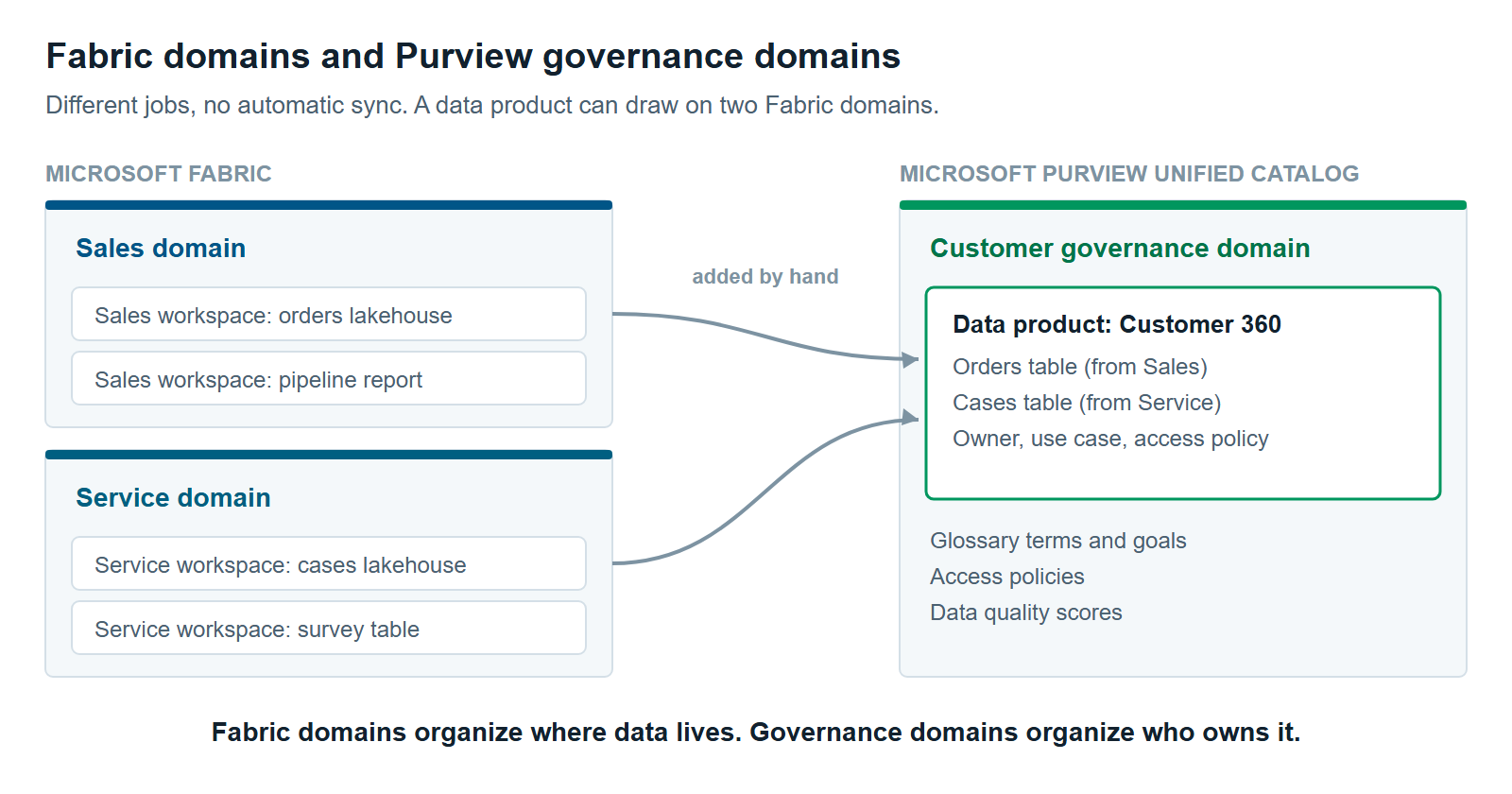
Microsoft doesn’t document any sync between the two. Assigning a workspace to a Fabric domain doesn’t place its tables in a governance domain. You build governance domains in Purview, then add Fabric tables to data products by hand after Purview scans them.
Three Ways to Map Fabric Domains to Governance Domains
You can map Fabric domains to governance domains in one of three ways. Mirror them, design governance domains around business use, or mix the two. The right choice depends on how your Fabric domains were set up.
Microsoft’s planning guide warns, “Don’t align your governance domains with your platform domains,” meaning Data Map domains that follow IT teams and systems. The same caution applies to Fabric domains built around technology. Governance domains should follow how the business uses data (Microsoft Learn).
1. Mirror them, one to one. Create one governance domain for each Fabric domain. This is the simplest option, and people see the same names in both tools. It works only when your Fabric domains already follow business areas, like Finance or Sales. If they follow technology, like “Ingestion” or “Bronze,” don’t copy them.
2. Design around business use. Build governance domains around how people use data, and let a data product pull tables from several Fabric domains. A “Customer 360” data product might use tables from the Sales and Service workspaces. This fits Microsoft’s guidance best. It takes more planning up front.
3. Mix the two. Mirror the Fabric domains that already match business areas. Then add governance domains that cut across them, such as a Customer data domain or a domain for a regulation. Microsoft rates a mix of domain types as the strongest structure, because it lasts through reorganizations.
What Goes Into Purview Data Products
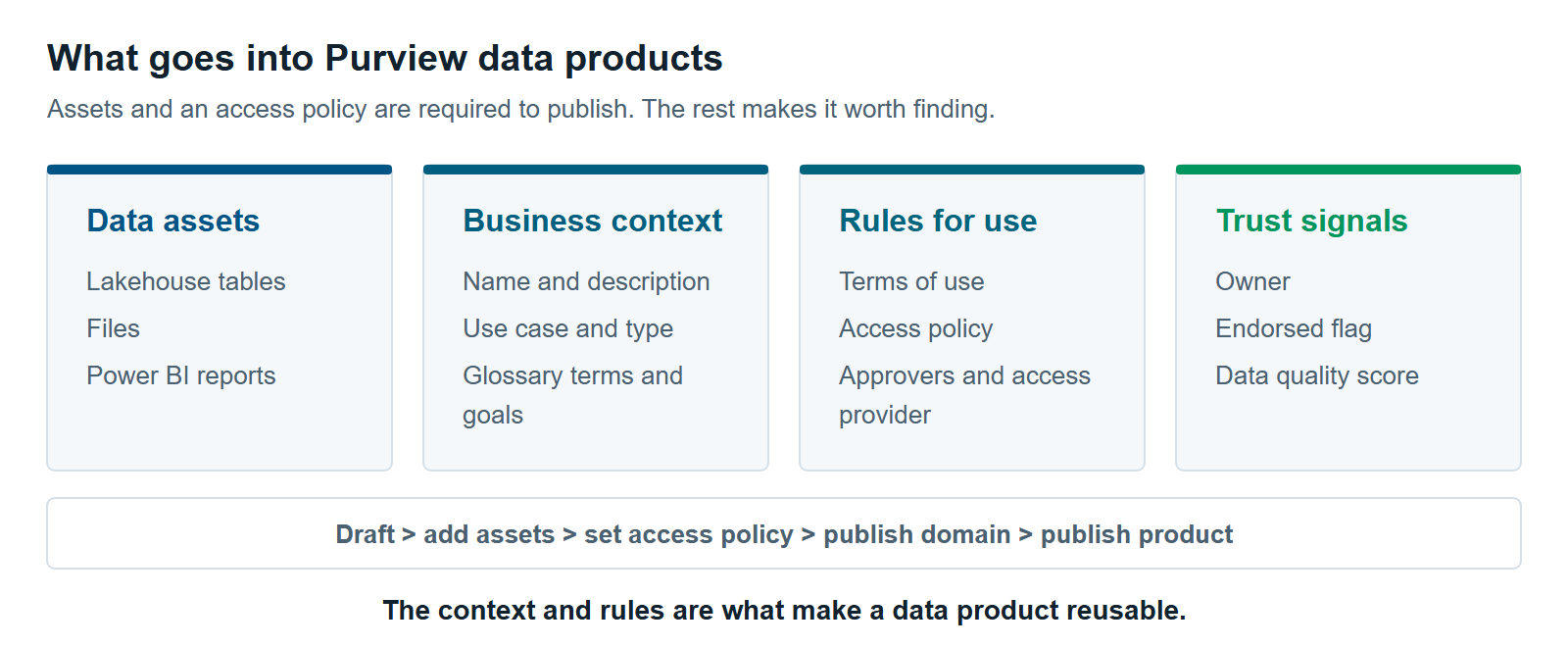
Purview data products carry four kinds of things. They hold the data itself, the business context around it, the rules for using it and signals that it can be trusted. To publish one, you need at least the data assets and an access policy.
- Data assets. The tables, files and reports in the product. Fabric lakehouse tables become available after Purview scans the Fabric workspace into the Purview Data Map.
- Business context. A name, a description, a use case and a type, such as dataset, dashboard or master data. Owners can link glossary terms and goals, called objectives and key results (OKRs).
- Rules for use. Terms of use, documentation and an access policy that sets who must approve a request.
- Trust signals. An endorsed flag set by the owner, and a data quality score averaged across its tables.
A new data product starts as a draft. To publish it, you add data assets, set an access policy and publish the governance domain first (Microsoft Learn). Removing a table later takes a data quality steward too, if rules have run on it.
Data products also drive cost. Every table you add counts as a governed asset in Purview’s pay-as-you-go billing. Our article on Microsoft Purview Pricing for Fabric: What You’ll Actually Pay explains that meter.
How Access Requests Work for Purview Data Products
Access requests for Purview data products follow a set path. A user finds the product, picks a purpose and requests access. Then up to four approvers sign off in order: the user’s manager, a privacy reviewer, the product’s approvers and an access provider (Microsoft Learn).
Two details matter for planning.
Someone still grants access by hand. Purview tracks the request and approvals, but it doesn’t open the Fabric workspace or table for the user. An approver or access provider grants access in Fabric, then marks each asset as provisioned in Purview.
Attestations are promises, not controls. Users can be asked to agree not to copy the data. Purview records the agreement but doesn’t enforce it.
Removing access takes two steps as well. You remove the user’s access in Fabric and delete the request in Purview. If you do only the Purview step, the user keeps access to the tables.
What Data Mesh Looks Like in Fabric and Purview
Data mesh in Fabric and Purview means business domains own their data and share it as products, with a few rules set centrally. Fabric gives you the domains and the platform. Purview gives you the products and the shared rules. Each piece covers part of the idea.
Microsoft describes Fabric’s data mesh support plainly. It “primarily supports organizing data into domains” and lets admins delegate some governance to domain level (Microsoft Learn).
Data mesh usually comes down to four ideas. Here’s where each one lands:
- Domains own their data. Fabric domains assign workspaces to business areas. Governance domain owners and data product owners take responsibility in Purview.
- Data is shared as a product. Purview data products give each dataset an owner, a description, terms of use and an access path.
- Teams build on a shared platform. Fabric workspaces and OneLake let each team build without standing up its own systems.
- Some rules stay central. Tenant settings and sensitivity labels apply across Fabric. In Purview, policies set on a governance domain or glossary term flow down to the data products that use them.
What’s still manual is the glue. Keeping the two domain lists aligned, granting access and moving tables into products all take people. Budget for that work, or the model drifts.
How to Start With Purview Data Products
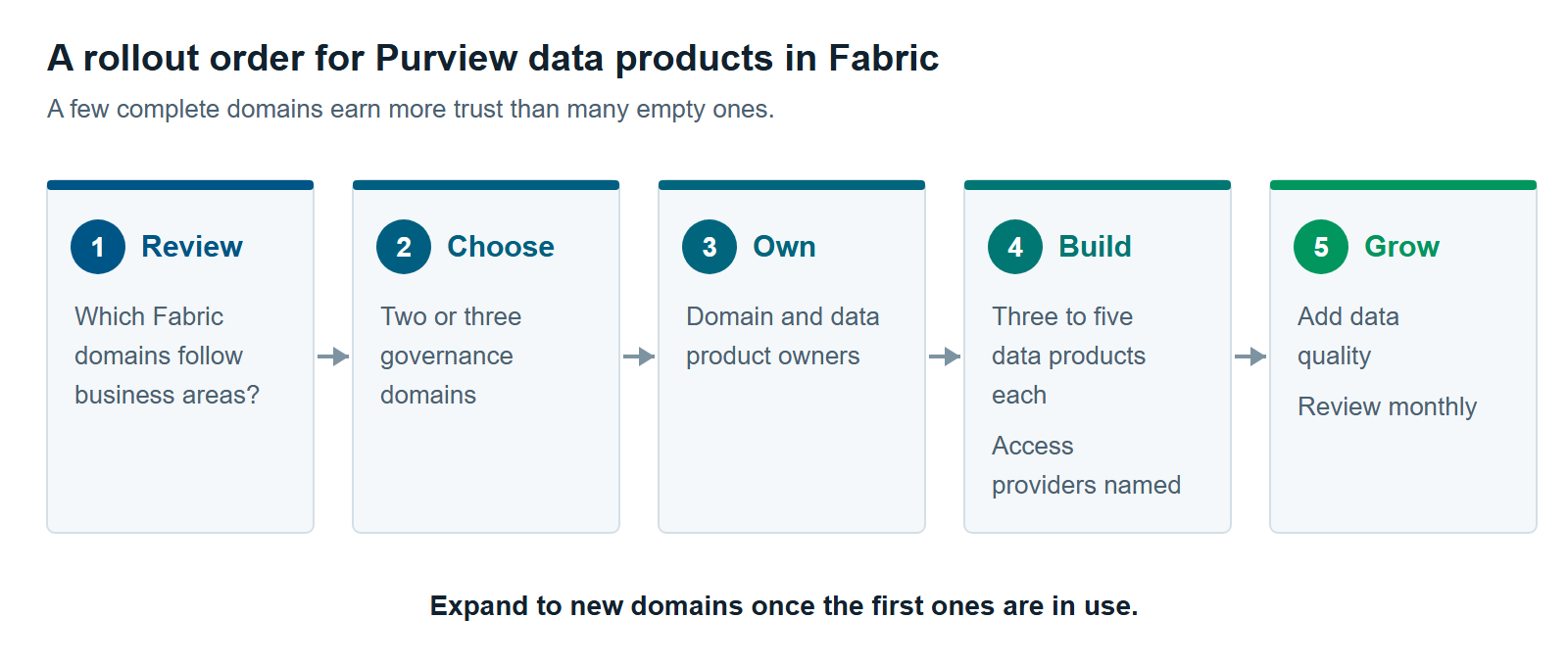
Start with two or three governance domains that already have strong data owners. Microsoft gives the same advice: begin where stewardship is strong, keep domains in draft until a few products are ready, then publish (Microsoft Learn).
- Review your Fabric domains. Note which ones follow business areas and which follow technology.
- Choose two or three governance domains. Mirror the business-aligned Fabric domains, and add one cross-cutting domain if many teams share key data.
- Name owners. Assign a governance domain owner and a data product owner for each product.
- Build three to five Purview data products per domain. Use gold tables and reports people already rely on.
- Set access policies and name access providers. Decide who grants access in Fabric.
- Publish, then add data quality. Add rules to the tables behind your most-used products.
- Review requests and usage each month. Expand to new domains once the first ones are in use.
For data quality on those products, read Data Quality in Fabric With Purview: What It Measures and What It Doesn’t. For where this fits in a wider rollout, see Microsoft Purview for Fabric: A Practical Guide to Securing and Governing Your Data. Our Microsoft Fabric consulting team can help you design the domain map.
When Fabric Domains Are Enough
Fabric domains are enough when all your analytics data lives in Fabric and one or two teams use it. In that case, filtering the OneLake catalog by domain and certifying trusted items may cover what you need.
Stay with Fabric domains for now if these are true:
- Your data is all in Fabric. You don’t need one catalog across other platforms.
- People ask a known team for data. A formal request path would add steps without adding control.
- Nobody would own a data product. Products without owners go stale fast. If ownership is the real gap, see anti-pattern #8, No Data Ownership, in The 12 Most Common Microsoft Fabric Anti-Patterns We See Across Every Assessment.
Use the time well. Set up Fabric domains that follow business areas, name owners and certify key items. Those steps make Purview data products faster to build later. For the full comparison, read OneLake Catalog vs. Purview Unified Catalog: When Fabric’s Built-In Governance Is Enough.
Further reading
- Data products in Unified Catalog — what a data product is and how it groups assets
- Plan for Microsoft Purview Unified Catalog — Microsoft’s guidance on governance domain structure
- Domains in Microsoft Fabric — Fabric domains, subdomains and delegated settings
- Manage data product access policies — approval tiers and manual provisioning
Pavan Malpani is the Fabric Practice Delivery Lead at XTIVIA. Talk to us.